
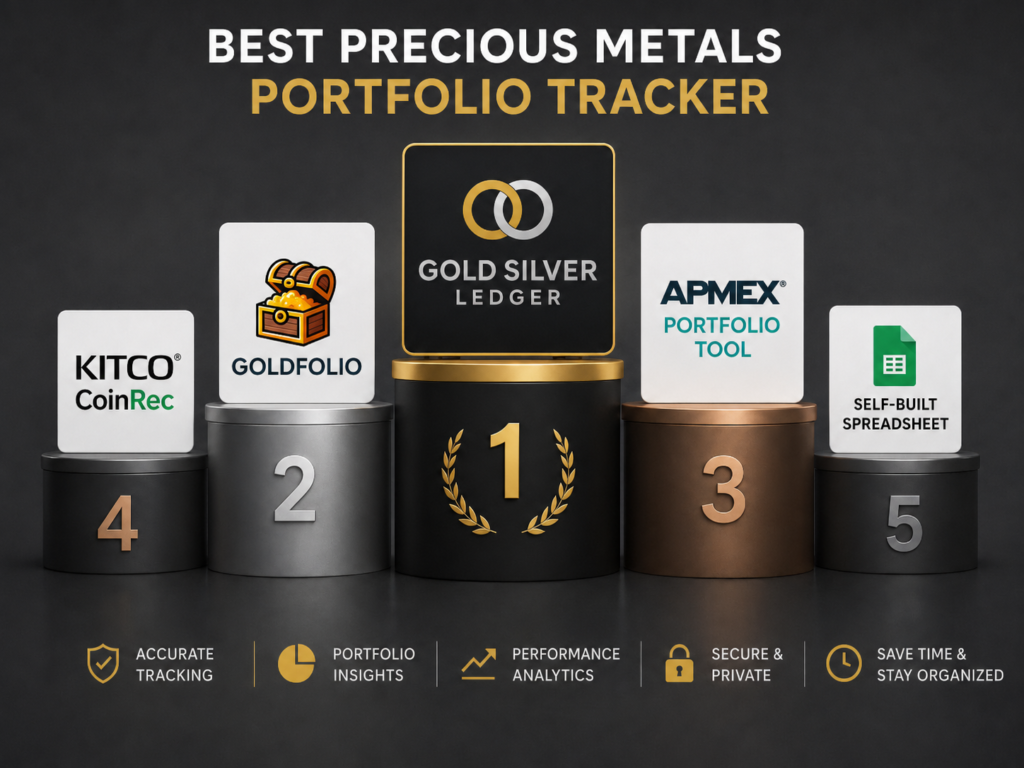
If you stack physical gold and silver, sooner or later you want a real answer to the same question: what is the best precious metals portfolio tracker, and which one should you actually use? Five tools cover most of the realistic options in 2026 — Gold Silver Ledger, Goldfolio, the APMEX Portfolio tool, Kitco’s CoinRec, and a self-built spreadsheet.
We ranked them against six criteria that matter to a working stacker, and each tool gets an honest read on what it does well and where it falls short.
The ranking at a glance
Gold Silver Ledger is the most complete dedicated tracker for physical bullion in 2026, followed by Goldfolio (mobile-only), the APMEX Portfolio tool, Kitco’s CoinRec (numismatic-focused), and a self-built spreadsheet.
Gold Silver Ledger ranks first because it is the only tool on the list that combines item-level inventory, Specific Identification cost basis on sales, premium-over-spot as a first-class field, fifteen-currency display, a comprehensive built-in bullion catalog, and a US tax-ready Annual Report.
The same six criteria, side by side.
| What you need | Gold Silver Ledger | Goldfolio | APMEX Portfolio | Kitco CoinRec | Spreadsheet |
| Item-level inventory | Yes | Partial | No | No | Manual |
| Live spot pricing | Yes (auto) | Yes (auto) | Yes (auto) | Yes (auto) | Formula hack |
| Premium-over-spot field | Yes | No | No | No | Manual column |
| Specific Identification on sales | Yes | No | No | No | Manual matching |
| Multi-currency display | 15 currencies | Limited | USD | USD / CAD | Manual |
| US tax-ready Annual Report | Yes (Premium) | No | No | No | Build it yourself |
| Built-in Bullion Catalog | Yes. 200+ products w/ thumbnails | No | Partial (APMEX products) | 300,000+ coins (numismatic) | Build it yourself |
How we ranked them
Six criteria decide the ranking. Each is something a serious stacker eventually wants a tracker to do, and each is a place where the five options diverge sharply.
Item-level inventory
An item-level inventory means every physical piece you own is its own record — buy ten American Silver Eagles in one purchase and the tracker stores ten separate items, not one row with a quantity of ten. That structure is what makes Specific Identification possible at sale and what gives you accurate days-held math on each piece.
Built-in bullion catalog
A built-in catalog is the list of products a tracker already knows about — government mint coins like the American Gold Eagle and Canadian Silver Maple Leaf, bars from refiners like PAMP Suisse and Sunshine Minting — with the weight, purity, and a product thumbnail already attached.
Gold Silver Ledger ships with a catalog of over 200 standard products covering most of what stackers actually buy, which means you populate your inventory by picking from a list rather than typing in specs and tracking down a photo each time.
The thumbnails turn a screen of numbers into something you can recognize at a glance, and the shared product entry behind every piece is what lets the app roll values up at the product level — every American Silver Eagle you own counts toward one product row above the individual pieces.
Live spot pricing
Spot prices move minute to minute. A tracker has to price your stack against current spot automatically, and ideally lock the spot value at the moment of each purchase, so historical premium-paid math stays accurate as live spot keeps drifting.
Premium-over-spot as a tracked field
Premium over spot is the markup a dealer charges above the live metal price. It belongs on every purchase row as a separate field, in dollars per unit, not as a percentage. Most tools bury premium inside a single “price paid” cell, which loses the split between melt and markup.
Specific Identification on sales
When you sell five of twenty Silver Eagles, the IRS lets you identify the exact five pieces that left your possession, so the cost basis on the return is the cost of those specific coins. Whether the tracker can do this cleanly, without manual matching, is the single biggest divider between purpose-built trackers and everything else on the list.
Multi-currency display
If you buy in US dollars but operate in another currency, a tracker should convert at display time without altering the historical record. Cross-currency math in a spreadsheet means a second FX column on every row, kept current by hand.
US tax-ready reporting
At tax time, you need numbers that map cleanly to Form 8949 and Schedule D: Proceeds, Cost Basis, Short-Term and Long-Term gain. A tracker that produces an annual report in that shape saves a weekend of spreadsheet work.
1. Gold Silver Ledger
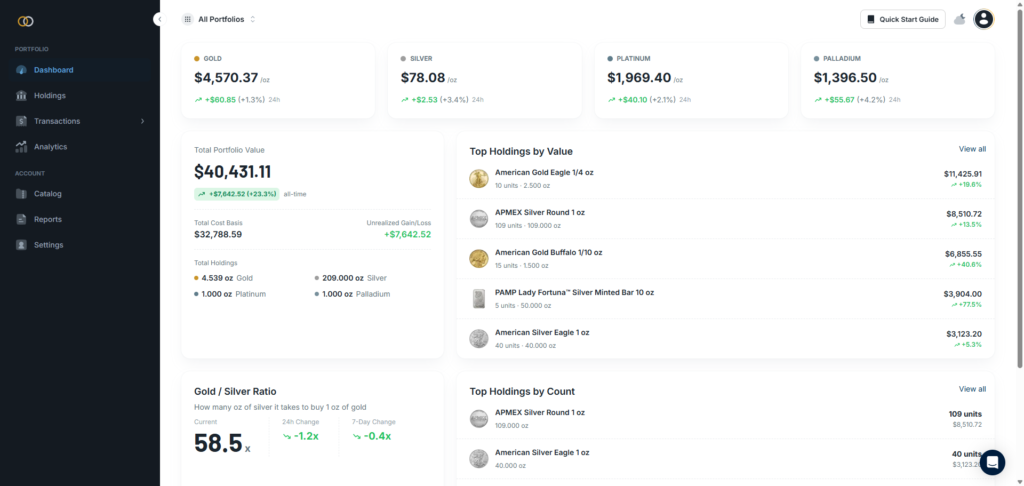
Gold Silver Ledger is a web portfolio tracker built specifically for physical gold, silver, platinum, and palladium. Every coin and every bar in the stack is its own record, picked from a built-in catalog of over 200 standard products — government mint coins, bars from major refiners, junk silver — each with the weight, purity, and a thumbnail already attached.
The Holdings page shows the same inventory three ways — grouped by metal, flat and sortable by column, or laid out as a wall of product photos with one card per piece.
Cost basis is captured at the moment of purchase, with premium-over-spot recorded in dollars as a separate field, and sales use Specific Identification by ticking individual coins out of held inventory.
Fifteen display currencies cover most of the Americas, Europe, Asia Pacific, and South Africa. The Premium-tier Annual Report rolls every recorded sale into a US tax-ready format. Three plans, all with a 14-day free trial.
Strengths
- Item-level inventory: One record per physical piece, not per product line.
- Specific Identification at sale: Tick the exact coins sold; cost basis and days-held are correct per piece.
- Premium-over-spot is a first-class field: Recorded in dollars per unit on every purchase, visible on every holding.
- Three Holdings views: Group, Item, and Card — same data, three framings.
- Fifteen display currencies: Values stored in USD, converted at render.
- US Annual Report (Premium): Total Proceeds, Cost Basis, Short-Term and Long-Term Gain or Loss, with a per-sale table that maps to Form 8949.
- Built-in product catalog: Around 170 standard government-mint coins, refiner bars, and junk silver pieces, each with weight, purity, and a thumbnail — pick from the list rather than typing in specs every time.
Limitations
- Specific Identification only: No FIFO or LIFO toggle.
- US tax reports only, for now: UK and Canada Annual Reports are on the roadmap.
- Physical bullion only: No tracking of ETFs, mining stocks, or unallocated metal.
- Analytics and the Annual Report are gated above Starter: Pro unlocks Analytics; the Annual Report sits on Premium.
2. Goldfolio
Goldfolio is a mobile-only precious metals portfolio app for iOS and Android, covering gold, silver, platinum, palladium, and copper. It is purpose-built for physical metal, with a clean ad-free interface and CSV bulk upload for migrating an existing collection.
Live spot pricing drives current-value math, and per-holding charts give a visual read on the portfolio over time. The platform constraint is the most important thing to know: there is no web app and no desktop version, so reconciling against desktop spreadsheets or printed dealer invoices is a typing exercise on a phone screen.
Strengths
- Purpose-built for physical metals: Not a general investment app with metals bolted on.
- iOS and Android native apps: Available on both major mobile platforms.
- Five metals covered: Gold, silver, platinum, palladium, and copper.
- Live spot pricing: Automatic current-value calculations on every holding.
- CSV bulk upload: Import an existing spreadsheet of holdings in one pass.
- Clean, ad-free interface: No upsell pressure inside the app.
Limitations
- Mobile-only: No web app, no desktop version.
- No US tax-ready annual report: Nothing in the app produces a Form 8949-shaped output.
- No published Specific Identification workflow on sales: Sales-side cost basis is a manual exercise.
- Limited multi-currency display: No fifteen-currency rendering layer comparable to Gold Silver Ledger.
3. APMEX Portfolio Tool
APMEX’s Portfolio tool is a free tracker built into the apmex.com customer account, designed primarily to monitor the gain or loss on holdings against acquisition cost. You can add any precious metals investment, whether or not you bought it from APMEX, and enter the price you paid; live spot drives the current-value column.
Custom price alerts for spot, individual products, and back-in-stock items live alongside the tracker in the same account. The context to understand is that this is a secondary feature of a shopping site, and the design priorities reflect that.
Strengths
- Free with an APMEX account: No paid tier; signup requires only an email.
- APMEX orders import automatically: Past purchases through APMEX flow in without manual entry.
- Live spot pricing: Current-value calculations update against live spot for the four major metals.
- Custom price alerts: Spot, product, and back-in-stock alerts in the same account.
- Established dealer behind it: A long retail track record most stackers recognize.
Limitations
- No item-level inventory: Holdings are stored at the product-and-quantity level, not as individual pieces.
- No Specific Identification workflow on sales: Partial-sale cost basis has to be reconstructed manually.
- No premium-over-spot field: The split between melt value and dealer markup is not tracked.
- No US tax-ready annual report: Nothing in the tool maps to Form 8949.
- Shopping-first context: The tool lives inside a dealer storefront.
4. Kitco CoinRec
CoinRec is Kitco’s mobile coin-recognition app. Point your camera at a coin and the app identifies it across a database of more than 300,000 global coins, then shows live melt value at current spot. Watchlists let you save individual coins, and the underlying spot data comes from Kitco’s market feed.
The scope to be clear about: CoinRec is for people whose collection skews numismatic — older sovereign issues, world coins, anything where identifying the piece is a real step before tracking it — not for managing a stack of modern bullion.
Strengths
- Camera-based coin recognition: Scans across more than 300,000 global coins.
- Live melt value: Calculated against Kitco’s spot feed for silver, gold, platinum, palladium, and rhodium.
- Watchlists: Save individual coins to monitor over time.
- Backed by Kitco market data: A long-established source for spot pricing in the industry.
- Free on iOS and Android: Available on both major mobile platforms with no paid tier required.
Limitations
- Numismatic and identification focus: Built around coin recognition, not around managing a working bullion stack.
- Limited cost basis on purchase rows: The tool optimizes for melt value, not for what you paid above spot.
- No premium-over-spot tracking: The dealer-markup split is not a tracked field.
- No Specific Identification workflow on sales: Sales-side reporting is outside the app’s scope.
- No US tax-ready annual report: No Form 8949-shaped output at tax time.
5. A spreadsheet (the DIY option)
A self-built spreadsheet in Google Sheets or Excel is the cheapest and most flexible way to track a precious metals portfolio, and the first thing most stackers eventually replace. For the first ten or twenty pieces, from one or two dealers, in a single currency, a spreadsheet is a perfectly reasonable starting point.
The structural problems show up later: live spot prices that will not stay current without a formula hack, a single “price paid” cell that buries the premium, Specific Identification that turns into manual matching once partial sales appear, and an FX column on every row the moment a second currency enters the picture.
Strengths
- Free: No subscription, no signup, no vendor lock-in.
- Unlimited rows: No item or transaction caps.
- Total layout flexibility: Track anything you want, in any column order.
- Easy to share and back up: Copy, version, or download to local storage at will.
- Works offline: A local spreadsheet keeps working without an internet connection.
Limitations
- No live spot pricing without formula tricks: The handful of formulas that pull live spot break periodically and silently.
- No built-in product catalog: Every coin and bar is typed in by hand, with weight and purity looked up each time.
- No Specific Identification on partial sales: Sales-side cost basis is reconstructed by hand each time.
- Cross-currency math is manual: A parallel FX column on every row, kept current by hand, is the only way to stay accurate.
- No annual report at tax time: Form 8949-shaped output has to be assembled from scratch.
The verdict
Gold Silver Ledger is the most complete dedicated tracker for physical bullion in 2026, followed by Goldfolio, the APMEX Portfolio tool, Kitco’s CoinRec, and a self-built spreadsheet. Each option has a reader it is right for.
Choose Gold Silver Ledger if you want item-level inventory, Specific Identification on sales, premium tracking, multi-currency display, and a US Annual Report in one place.
Choose Goldfolio if you are mobile-first and do not need a tax-ready annual report. Choose APMEX Portfolio if your holdings sit almost entirely with APMEX, and a simple gain-loss readout is enough.
Choose CoinRec if your collection skews numismatic and identification is the bottleneck before tracking.
Stay on a spreadsheet if your stack is under twenty pieces, in one currency, and you do not plan to sell.
